VocabBuilder
Master vocabulary through spaced repetition — with daily reminders, progressive difficulty, and intelligent streak tracking. Perfect for GMAT, GRE, LSAT, and everyday learning.
Master vocabulary through spaced repetition — with daily reminders, progressive difficulty, and intelligent streak tracking. Perfect for GMAT, GRE, LSAT, and everyday learning.
Proven spaced repetition science meets daily habit building.
Progressive review intervals (1→3→7→14→30 days) optimize memory consolidation and long-term retention.
Smart 9 AM notifications keep you consistent. Build vocabulary as a daily habit, not a chore.
Choose Simple, Medium, Complex, or Competitive mode. Learn at your pace, from everyday to exam-level vocabulary.
Earn streak badges (3→7→30→365 days), word milestones, and monthly challenges to stay motivated.
Monitor your current streak, total words learned, daily goals, and monthly progress in real-time.
IPA pronunciation, etymology, synonyms, antonyms, and usage examples for deeper understanding.
Whether you’re preparing for an exam or building a lifelong vocabulary habit.
Master GMAT, GRE, LSAT, or CAT-level vocabulary with competitive exam words.
Build everyday and academic English at your own pace.
Sharpen communication for writing, presentations, and public speaking.
Build casual daily habits with a low-friction side panel experience.
100% local processing. Nothing leaves your browser.
All progress and word data stays in your browser. No servers, no cloud, no accounts.
Zero analytics, zero cookies, zero data collection. We don’t know who you are.
Everything runs inside the extension. No CDNs, no remote code, no dependencies.
Every line of code is on GitHub. Audit it yourself — we have nothing to hide.
Get it from the Edge Add-ons store.
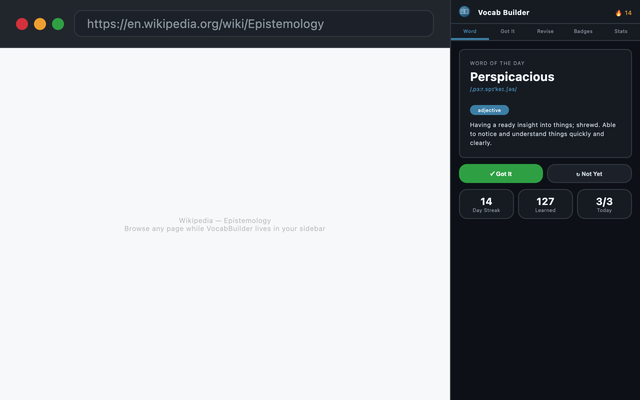
Click the VocabBuilder icon in your toolbar. The extension opens in the browser sidebar.
Select difficulty (Simple, Medium, Complex, or Competitive) in Settings based on your goals.
Review your first word. Mark “Got It” when you know it, or “Not Yet” to review again later.